




Xero Tips and Tricks - Keyboard shortcuts

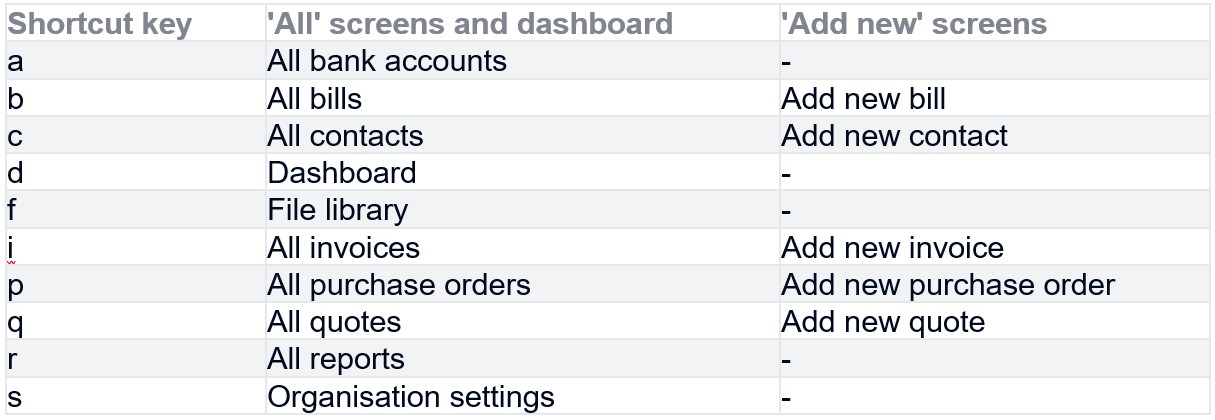
Did you know that there are a large number of keyboard shortcuts available to help you navigate around Xero, add new invoices, contacts?
The navigational keyboard shortcuts work from any screen in Xero , except Fixed Assets, Reporting, Projects, Expenses and Payroll). Simply press the forward slash key (/) followed by the shortcut key in the table below and hit Enter.
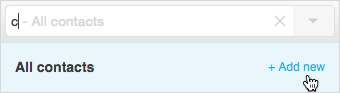
To use the Add new function click use the same forward slash and shortcut key combination and click the Add new option that appears below the search bar.

Subscribe to
Inspired
Our monthly bulletin INSPIRED is packed with useful articles to keep you up to date with news and legislation that may affect you or your business.


Related news stories


Armstrong Watson can help
Whether you need expert accounting, strategic business advisory, tax planning, or financial guidance, our experienced team is here to support your success. From sole traders to large enterprises, we provide tailored solutions to help you navigate complex financial challenges and achieve your goals. Get in touch today to discover how we can help your business thrive – call 0808 144 5575.


