




Xero User News - Setting up Multi-factor authentication (MFA) without a smartphone or tablet

Back in the May newsletter we talked about the new measures Xero have implemented to add a second layer of security to your login. MFA is designed to prevent anyone but you from accessing your account even if they know your password.
If you have a smartphone or tablet then the easiest solution is to download the “Xero Verify” application, but what if you don’t have access to either of these?
The answer is to download the “Authy” application to your laptop or PC.
- Open a web browser page and search for “Authy download” then select the desktop option choosing macOS or a windows option. Click the download button.
- Once Authy has downloaded open it. Follow the wizard through entering the necessary information.
- You will then see this screen
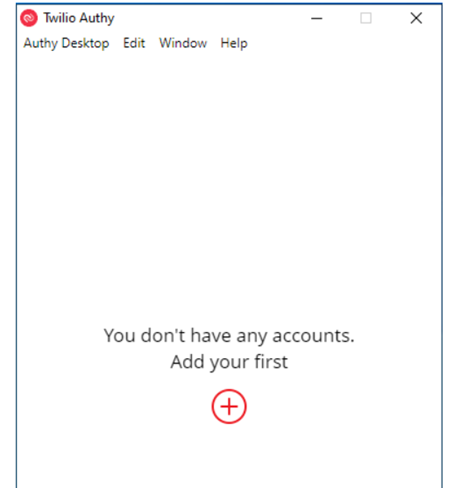
- Click on the + sign to add your account. You will be prompted to enter a code from your xero account.
- Open up Xero in a browser.
- If you haven’t already set up the MFA you will be prompted to do so when logging in to Xero. Click “Set up multi-factor authentication”.
- You will then be asked to choose an authenticator app, select “Use my own app”.
- Choose the “cant scan the QR code? Enter a set up key instead.” Option.
- Next to the set up key choose copy, go back to the Authy app and paste the code.
- You will then be prompted to choose a token length. Choose 6 digit.
- Complete the install of the Authy app on your computer.
- You will see Authy will start generating your 6 digits codes. Take a note of the code.
- Go back to your Xero and enter the 6 digit code from Authy and click confirm.
- You will then be prompted to enter a back up email address and confirm it using a verification code sent to your back up email address.
The following video Set up MFA without a smartphone or tablet will take you through the install of the Authy authenticator app and setting up your MFA.
Subscribe to
Inspired
Our monthly bulletin INSPIRED is packed with useful articles to keep you up to date with news and legislation that may affect you or your business.


Related news stories


Armstrong Watson can help
Whether you need expert accounting, strategic business advisory, tax planning, or financial guidance, our experienced team is here to support your success. From sole traders to large enterprises, we provide tailored solutions to help you navigate complex financial challenges and achieve your goals. Get in touch today to discover how we can help your business thrive – call 0808 144 5575.


